
smush for Mac
a little about smush.
smush is a native macOS menu bar app that animates transitions between your cursor’s shapes.
what does smush do?
Hover over a link and the arrow becomes a hand. smush animates changes like that using the cursor artwork you already see on your Mac.
which Macs can run it?
smush requires macOS 14 (Sonoma) or later.
can I change the animation speed?
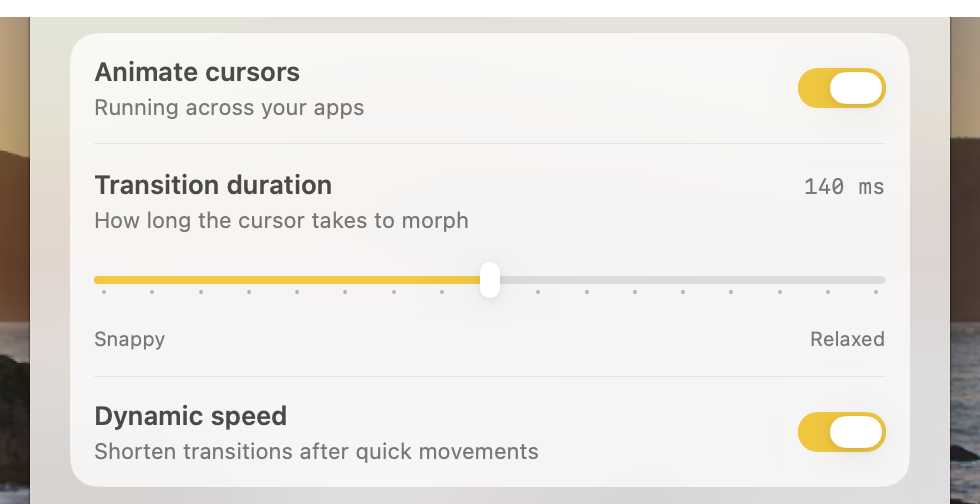
Yes. Set the transition duration in Settings. Dynamic speed can shorten transitions after quick movements, and you can pause animations from the menu bar or with a keyboard shortcut.
how does it affect performance?
smush reuses cursor images it has already drawn. It pauses drawing between transitions and keeps watching for the next shape change.
In a 10-minute test on an M2 MacBook Air, smush averaged 5.3% of one CPU core. The test was mostly Sketch work with some web browsing.
how much does smush cost?
Try smush for 14 days without a credit card. It’s $4.99 once if you want to keep using it.
Having trouble starting or recovering a trial? Get trial help.
can I share a license?
Yes. Share your key privately with friends or family. One license covers three Macs total across everyone using it. People sharing the key can see the purchaser’s name and active Mac names/models, and remove activations. Public key sharing and resale are not allowed.
where do settings live?
Settings stay on your Mac. The privacy policy explains what smush sends when you use online features like updates, licensing, or support.
who makes it?
I’m Owen Van Vooren. I made smush. You can report a bug or read the release notes here.
try the cursor animation